How to Use Camera Pro Mode on Pixel 11 Pro with Android 17
Pro controls put manual camera settings on the Pixel 11 Pro — ISO, White Balance, Focus and Shutter Speed — with live readouts at the top of the viewfinder. Open Camera, swipe the mode row, and open the controls to see them.
- DeviceGoogle Pixel 11 Pro
- SystemAndroid 17
- AppCamera
- Also works onOther Pixel phones running Android 17
- Last verifiedNovember 8, 2026
Every screenshot below is taken from the actual recording on this device — no stock images.
Steps
Tap the Camera app
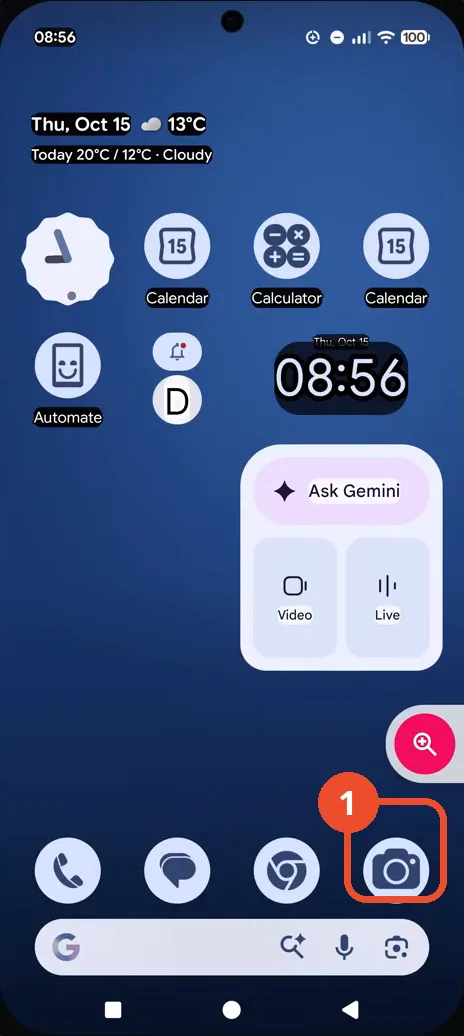
On the Home screen, tap the Camera app in the dock at the bottom right.
Swipe the mode row to see more camera modes
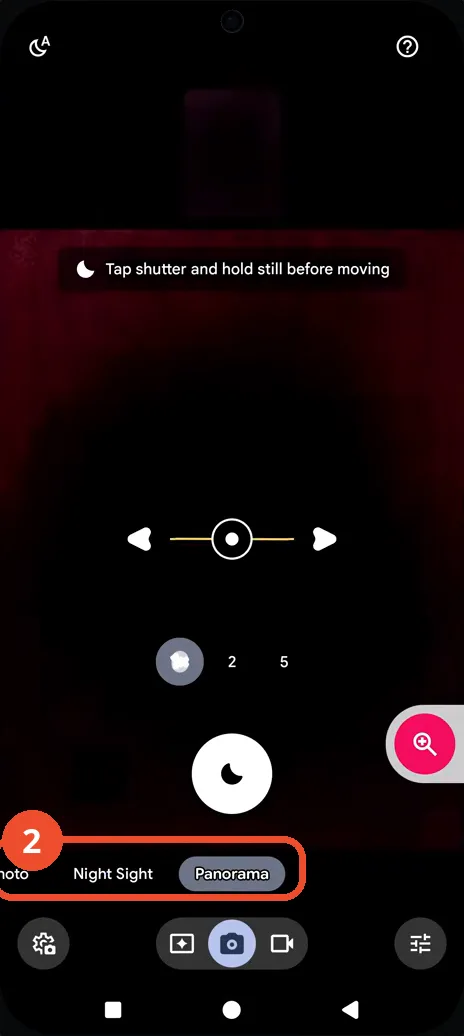
In Camera, swipe the mode row left: Night Sight and Panorama come into view, and the Night Sight hint — “Tap shutter and hold still before moving” — is showing.
Open Pro controls
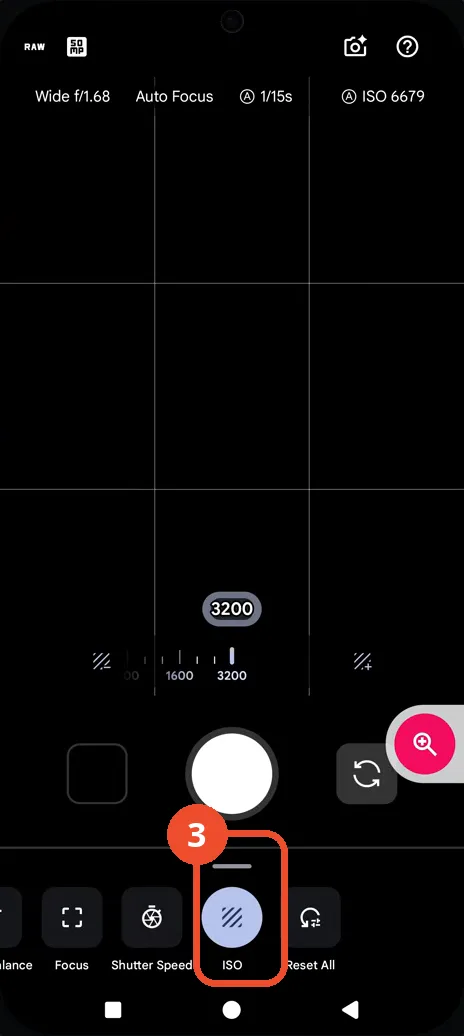
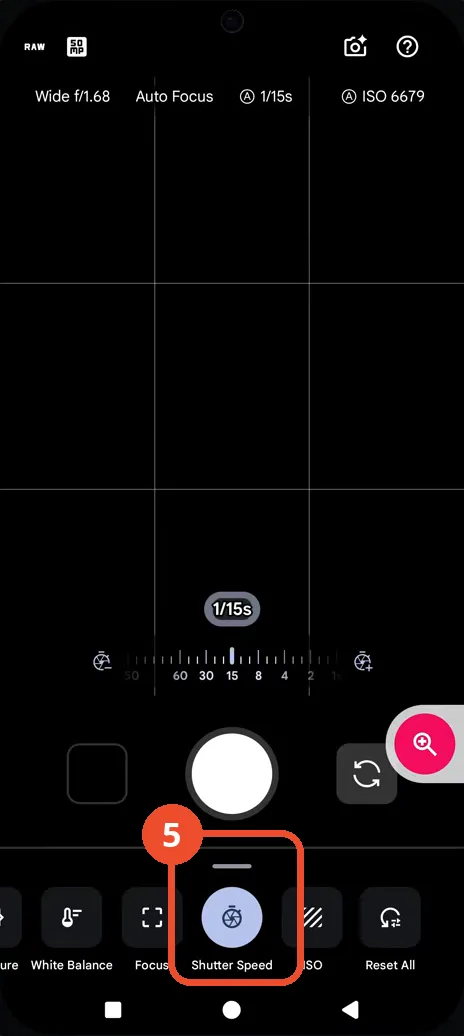
Tap the controls button at the bottom right of the viewfinder: the Pro controls sheet opens with White Balance, Focus, Shutter Speed, ISO and Reset All, and the readouts show Wide f/1.68, Auto Focus, 1/15s and ISO 6679 — all on Auto.
Tap Shutter Speed to see what it does
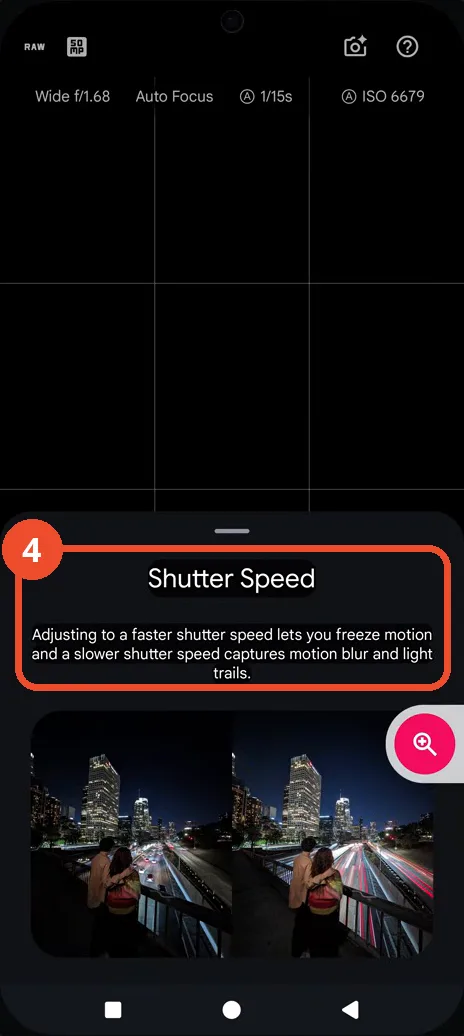
Tap Shutter Speed in the control row: an explainer card opens — a faster shutter speed freezes motion, a slower one captures motion blur and light trails — with a sample night photo.
Return to the Pro controls
Close the card to return to the Pro controls: Shutter Speed is selected and its slider sits at 1/15s on Auto, with the Wide f/1.68, Auto Focus and ISO 6679 readouts still visible at the top.
Good to know
- Every control shown is on Auto — the video explores where the controls are, it does not change any value: shutter speed stays 1/15s on Auto and ISO stays 6679 on Auto.
- While exploring, the video also taps Focus — “Peaking active” appears at the top of the viewfinder while focus peaking is on.
- The camera is pointing at a dark scene in this recording, which is why the readouts show a slow 1/15s shutter and a high ISO 6679.
- The ISO slider thumb sits at 3200 while the top readout reports the live Auto value, ISO 6679 — the video changes neither value.
- The Shutter Speed card’s sample photo is part of the Camera app’s own explainer — it is not a photo taken during the recording.
- Change App Icons on Google Pixel 11 Pro
- Turn On the Flashlight on Google Pixel 11 Pro
- Turn Off Pop-Up Notifications for Messages on Google Pixel 11 Pro
- Turn On Spoken Directions in Google Maps on Google Pixel 11 Pro
- Find Call Recording Settings on Google Pixel 11 Pro
- Change Text Tone in Google Messages on Google Pixel 11 Pro
- Block Spam Calls on Google Pixel 11 Pro
- How to Find Apps on Google Pixel 11 Pro
- How to Find System Apps on Google Pixel 11 Pro
- How to Open the Power Menu with the Power Button on Google Pixel 11 Pro
- How to Check VoLTE Support on Google Pixel 11 Pro
- How to Change the Google Messages Notification Sound on Google Pixel 11 Pro
- How to Change System Colors on Google Pixel 11 Pro
- How to Check RAM Usage on Google Pixel 11 Pro
- How to Edit Quick Settings Tiles on Google Pixel 11 Pro
- How to Enable GPS Location on Google Pixel 11 Pro
- How to Set a Ringtone for One Contact on Google Pixel 11 Pro
- How to Enable Daily Changing Wallpaper on Google Pixel 11 Pro
- How to Change Font Size on Google Pixel 11 Pro
- How to Customize the Google Search Bar on Pixel 11 Pro with Android 17
- How to Use Macro Focus on Pixel 11 Pro with Android 17
- How to View Blocked Numbers on Pixel 11 Pro with Android 17
- How to Adjust Volume Without Buttons on Google Pixel 11 Pro
- Where Is NFC on the Google Pixel 11 Pro with Android 17?
- How to Adjust Camera ISO on Pixel 11 Pro with Android 17
- How to Turn On Camera Flash on Pixel 11 Pro with Android 17
- How to Check Desktop Experience on Pixel 11 Pro with Android 17
- How to Show Wallpaper on Always-on Display on Pixel 11 Pro with Android 17
- How to Enable or Disable Google Discover on Pixel 11 Pro with Android 17
- How to Find Deleted Messages in Google Messages on Pixel 11 Pro with Android 17
- How to Check the App Drawer Layout on Pixel 11 Pro with Android 17
- How to Turn on Dark Theme on Pixel 11 Pro with Android 17
- How to Change Media Output on Pixel 11 Pro with Android 17
- How to Change App Size on Pixel 11 Pro with Android 17
- How to Turn Off Motion Photo on Pixel 11 Pro with Android 17
- How to View Call History on Pixel 11 Pro with Android 17
- How to Turn On Sensitive Content Warnings on Pixel 11 Pro with Android 17