How to Find System Volume Controls on Pixel 11 Pro with Android 17
Every volume level on the Pixel 11 Pro — media, calls, ring, notifications, alarms and Assistant — lives on one Settings page. This is the route to it through Quick Settings. Nothing is changed along the way: the video only opens the page and shows the current levels.
✅ Tested on
- DeviceGoogle Pixel 11 Pro
- SystemAndroid 17
- AppSettings
- Also works onOther Pixel phones running Android 17
- Last verifiedNovember 15, 2026
Every screenshot below is taken from the actual recording on this device — no stock images.
Steps
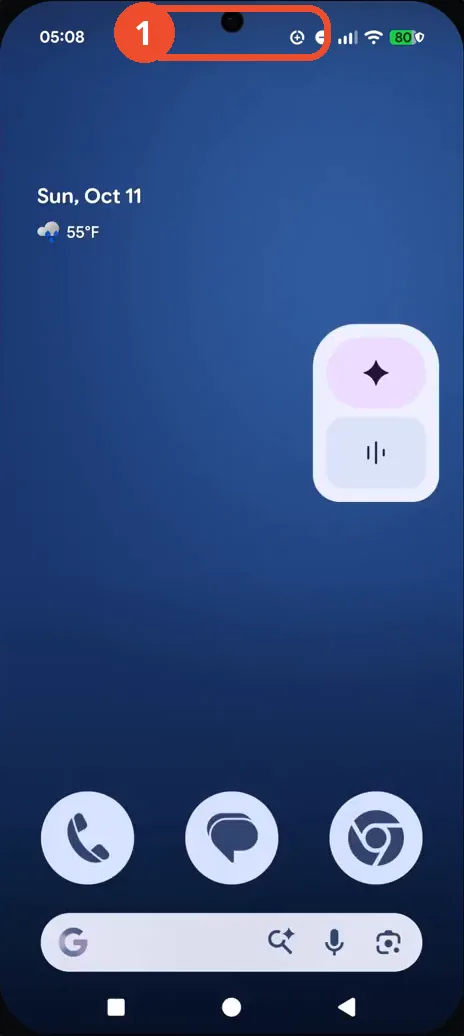
Swipe down to open Quick Settings
Swipe down from the top of the screen to open Quick Settings.
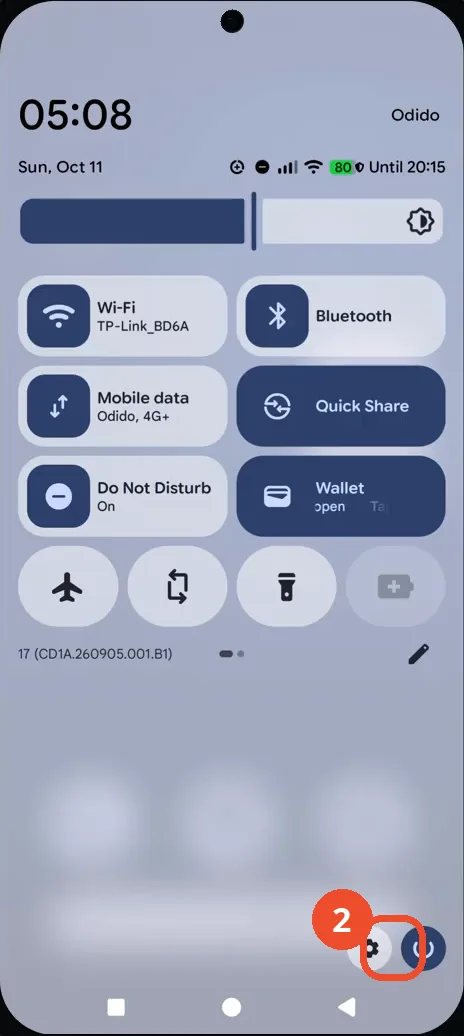
Swipe down again and tap the Settings gear
Swipe down again to expand Quick Settings fully, then tap the gear icon at the bottom right.
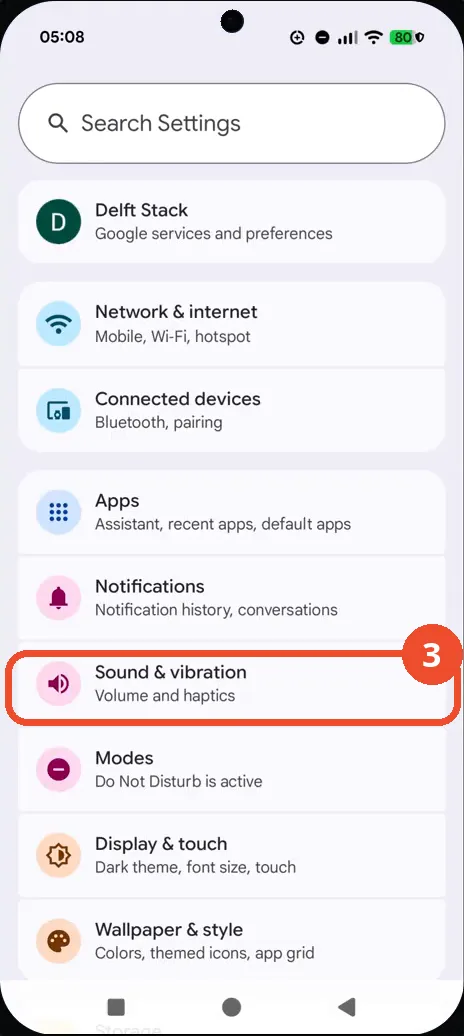
Tap Sound & vibration
In Settings, tap Sound & vibration — Volume and haptics.
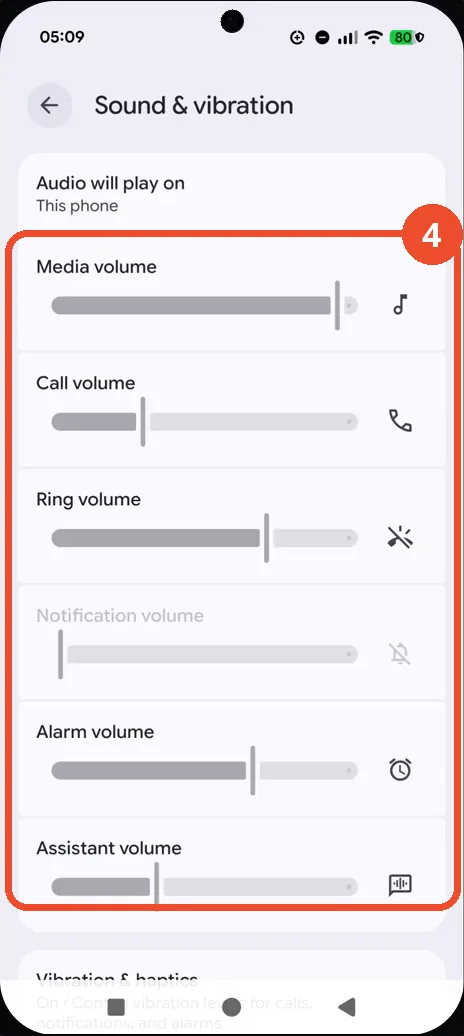
Check the system volume controls
The Sound & vibration page shows every level on one screen: Media volume, Call volume, Ring volume, Notification volume, Alarm volume and Assistant volume. That is the confirmation.
Good to know
- Nothing is changed in this recording — the video only opens the Sound & vibration page. No slider is dragged and no level moves.
- To actually change a level, drag a slider on the same page — the change applies immediately. That step is covered by the companion article on adjusting volume without the hardware buttons.
- Notification volume is greyed out while Do Not Disturb is on (shown under Modes) — turn Do Not Disturb off if you need to change it.
- Audio will play on reads “This phone” at the top of the page — if it points at earbuds or another device, the media slider controls that device instead.
- This recording takes the Quick Settings route; the app drawer route (swipe up, tap Settings) reaches the same Sound & vibration page.
- Change App Icons on Google Pixel 11 Pro
- Turn On the Flashlight on Google Pixel 11 Pro
- Turn Off Pop-Up Notifications for Messages on Google Pixel 11 Pro
- Turn On Spoken Directions in Google Maps on Google Pixel 11 Pro
- Find Call Recording Settings on Google Pixel 11 Pro
- Change Text Tone in Google Messages on Google Pixel 11 Pro
- Block Spam Calls on Google Pixel 11 Pro
- How to Find Apps on Google Pixel 11 Pro
- How to Find System Apps on Google Pixel 11 Pro
- How to Open the Power Menu with the Power Button on Google Pixel 11 Pro
- How to Check VoLTE Support on Google Pixel 11 Pro
- How to Change the Google Messages Notification Sound on Google Pixel 11 Pro
- How to Change System Colors on Google Pixel 11 Pro
- How to Check RAM Usage on Google Pixel 11 Pro
- How to Edit Quick Settings Tiles on Google Pixel 11 Pro
- How to Enable GPS Location on Google Pixel 11 Pro
- How to Set a Ringtone for One Contact on Google Pixel 11 Pro
- How to Enable Daily Changing Wallpaper on Google Pixel 11 Pro
- How to Change Font Size on Google Pixel 11 Pro
- How to Customize the Google Search Bar on Pixel 11 Pro with Android 17
- How to Use Macro Focus on Pixel 11 Pro with Android 17
- How to View Blocked Numbers on Pixel 11 Pro with Android 17
- How to Adjust Volume Without Buttons on Google Pixel 11 Pro
- Where Is NFC on the Google Pixel 11 Pro with Android 17?
- How to Adjust Camera ISO on Pixel 11 Pro with Android 17
- How to Turn On Camera Flash on Pixel 11 Pro with Android 17
- How to Check Desktop Experience on Pixel 11 Pro with Android 17
- How to Show Wallpaper on Always-on Display on Pixel 11 Pro with Android 17
- How to Enable or Disable Google Discover on Pixel 11 Pro with Android 17
- How to Find Deleted Messages in Google Messages on Pixel 11 Pro with Android 17
- How to Check the App Drawer Layout on Pixel 11 Pro with Android 17
- How to Turn on Dark Theme on Pixel 11 Pro with Android 17
- How to Change Media Output on Pixel 11 Pro with Android 17
- How to Change App Size on Pixel 11 Pro with Android 17
- How to Turn Off Motion Photo on Pixel 11 Pro with Android 17
- How to Turn On Sensitive Content Warnings on Pixel 11 Pro with Android 17
- How to Use Camera Pro Mode on Pixel 11 Pro with Android 17
- How to View Call History on Pixel 11 Pro with Android 17
- How to Change the Lock Screen Clock on Pixel 11 Pro with Android 17
- How to Manage Bubbles on Pixel 11 Pro with Android 17
- How to Change Keyboards on Pixel 11 Pro with Android 17
- How to Check for Reverse Wireless Charging on Pixel 11 Pro with Android 17
- How to Check Status Bar Notifications on Pixel 11 Pro with Android 17
- How to Find the Camera Shutter Sound Setting on Pixel 11 Pro with Android 17
- How to Change the Home Screen Grid on Pixel 11 Pro with Android 17
- How to Delete Call History on Pixel 11 Pro with Android 17
- How to Change the Ringtone on Pixel 11 Pro with Pixel Sounds
- How to Customize the Clock Widget on Pixel 11 Pro with Android 17
- How to Open Gboard Keyboard Settings on Pixel 11 Pro with Android 17
- How to Find Magic Eraser in Google Photos on Pixel 11 Pro with Android 17
- How to Turn Night Light Off and On on Pixel 11 Pro with Android 17
- How to Improve Phone Sound Quality on Pixel 11 Pro with Android 17