How to Find Deleted Messages in Google Messages on Pixel 11 Pro with Android 17
Deleted chats in Google Messages are not gone right away: they sit in Trash for 30 days. Open Trash from the account menu, select the chat, and tap restore to bring it back.
- DeviceGoogle Pixel 11 Pro
- SystemAndroid 17
- AppGoogle Messages
- Also works onOther Pixel phones running Android 17
- Last verifiedNovember 6, 2026
Every screenshot below is taken from the actual recording on this device — no stock images.
Steps
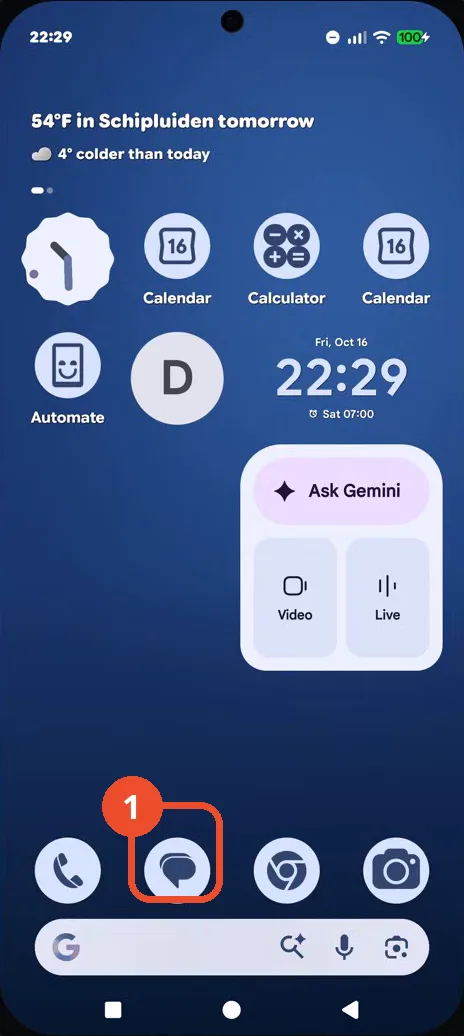
Open Google Messages
On the Home screen, tap the Messages icon in the dock.
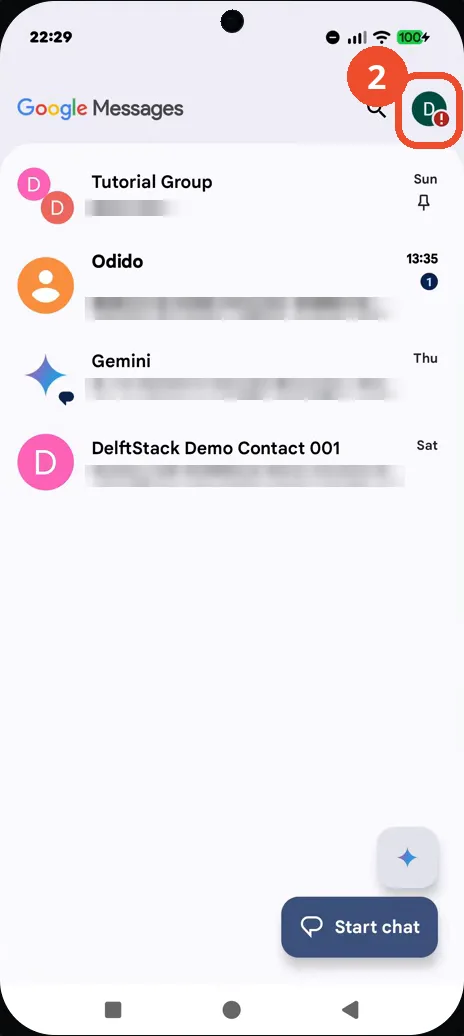
Tap your profile picture
In Google Messages, tap your profile picture at the top right to open the account menu.
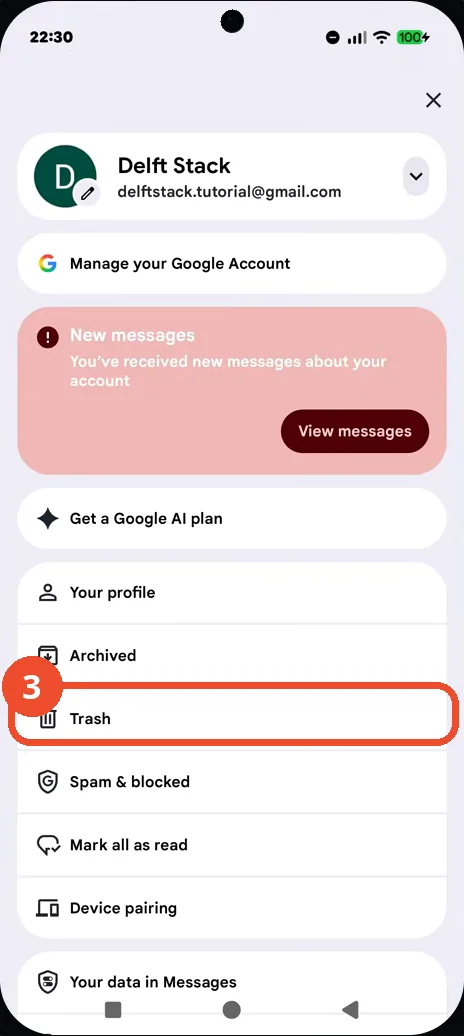
Tap Trash
In the menu, tap Trash: deleted chats stay there for 30 days before they are deleted for good.
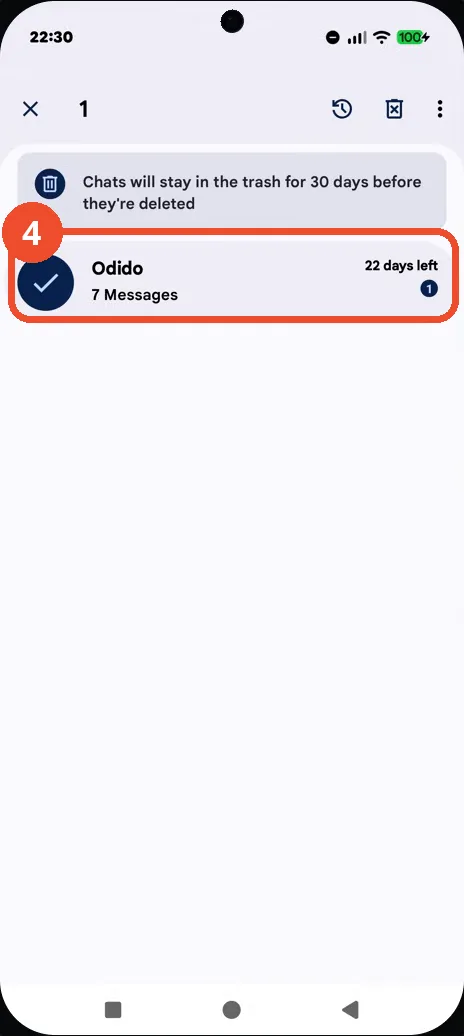
Select the deleted chat
In Trash, long-press the chat you want back — here the Odido chat with 7 Messages and 22 days left: a check mark appears and the top bar switches to selection mode.
Tap the restore icon
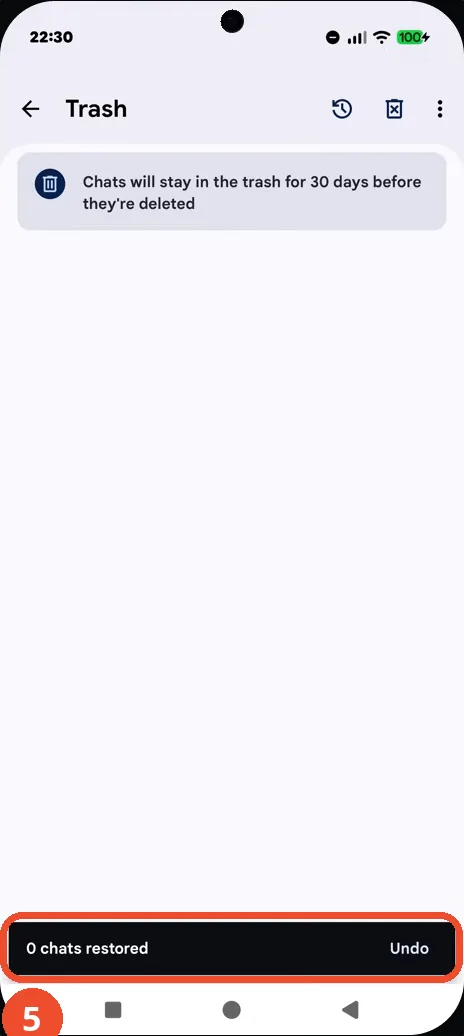
Tap the restore (clock) icon at the top of the Trash page: the chat leaves Trash. The confirmation reads ‘0 chats restored’ — tap Undo in the next few seconds if that was a mistake.
Good to know
- Deleted chats stay in Trash for 30 days — the page says so, and each chat shows how many days it has left (22 days left here).
- The confirmation snackbar reads ‘0 chats restored’ even though the chat disappears from Trash; the video does not go back to the conversation list to show the chat restored there, so confirm it in the list yourself.
- To delete a trashed chat for good instead, select it and tap the delete (trash can) icon — that step is not shown in this recording.
- This is different from changing the message tone or notification sound: those settings live on the conversation, not in Trash.
- Change App Icons on Google Pixel 11 Pro
- Turn On the Flashlight on Google Pixel 11 Pro
- Turn Off Pop-Up Notifications for Messages on Google Pixel 11 Pro
- Turn On Spoken Directions in Google Maps on Google Pixel 11 Pro
- Find Call Recording Settings on Google Pixel 11 Pro
- Change Text Tone in Google Messages on Google Pixel 11 Pro
- Block Spam Calls on Google Pixel 11 Pro
- How to Find Apps on Google Pixel 11 Pro
- How to Find System Apps on Google Pixel 11 Pro
- How to Open the Power Menu with the Power Button on Google Pixel 11 Pro
- How to Check VoLTE Support on Google Pixel 11 Pro
- How to Change the Google Messages Notification Sound on Google Pixel 11 Pro
- How to Change System Colors on Google Pixel 11 Pro
- How to Check RAM Usage on Google Pixel 11 Pro
- How to Edit Quick Settings Tiles on Google Pixel 11 Pro
- How to Enable GPS Location on Google Pixel 11 Pro
- How to Set a Ringtone for One Contact on Google Pixel 11 Pro
- How to Enable Daily Changing Wallpaper on Google Pixel 11 Pro
- How to Change Font Size on Google Pixel 11 Pro
- How to Customize the Google Search Bar on Pixel 11 Pro with Android 17
- How to Use Macro Focus on Pixel 11 Pro with Android 17
- How to View Blocked Numbers on Pixel 11 Pro with Android 17
- How to Adjust Volume Without Buttons on Google Pixel 11 Pro
- Where Is NFC on the Google Pixel 11 Pro with Android 17?
- How to Adjust Camera ISO on Pixel 11 Pro with Android 17
- How to Turn On Camera Flash on Pixel 11 Pro with Android 17
- How to Check Desktop Experience on Pixel 11 Pro with Android 17
- How to Show Wallpaper on Always-on Display on Pixel 11 Pro with Android 17
- How to Turn Off Motion Photo on Pixel 11 Pro with Android 17
- How to Enable or Disable Google Discover on Pixel 11 Pro with Android 17
- How to Check the App Drawer Layout on Pixel 11 Pro with Android 17