How to Fix TikTok Messages Not Sending
When TikTok messages refuse to send, the recording works through the three causes that cover almost every case: the two accounts do not follow each other, TikTok has temporarily restricted the account, or the app itself needs its cache cleared. Names and photos in the list screenshot are blurred for privacy; the badges you need to check are left readable on purpose. Work through the steps in order — each one rules out one cause.
- SystemAndroid
- AppTikTok
- Also works oniPhone (the menus are the same)
- Last verifiedOctober 28, 2026
Every screenshot below is taken from the actual recording on this device — no stock images.
Before you start
- TikTok direct messages only work between accounts that follow each other (or accounts that have messaged before). A one-way follow is the most common cause.
- A restriction after a report, a number change or an age check usually lifts by itself after about 24 hours.
- Clearing the cache is safe: it does not delete your drafts, videos or account data — those live in the separate Downloads and Drafts sections on the same page.
Steps
Check you follow each other
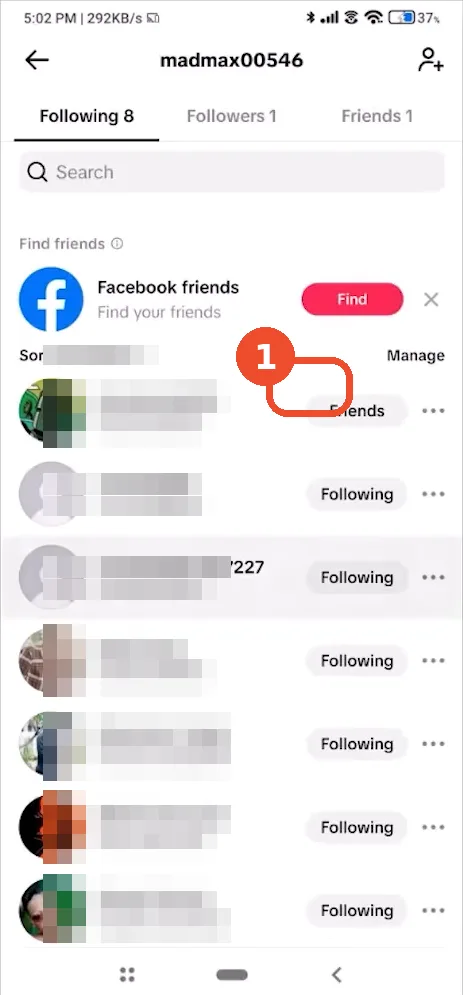
Open your Following list from your profile and find the person. The badge next to their name must say Friends — that is TikTok’s marker for “you follow each other”. If it says Following instead, they have not followed you back and your messages cannot be delivered; ask them to follow you first. (Names and photos are blurred here; the badge is what matters.)
Rule out a restriction in TikTok Support
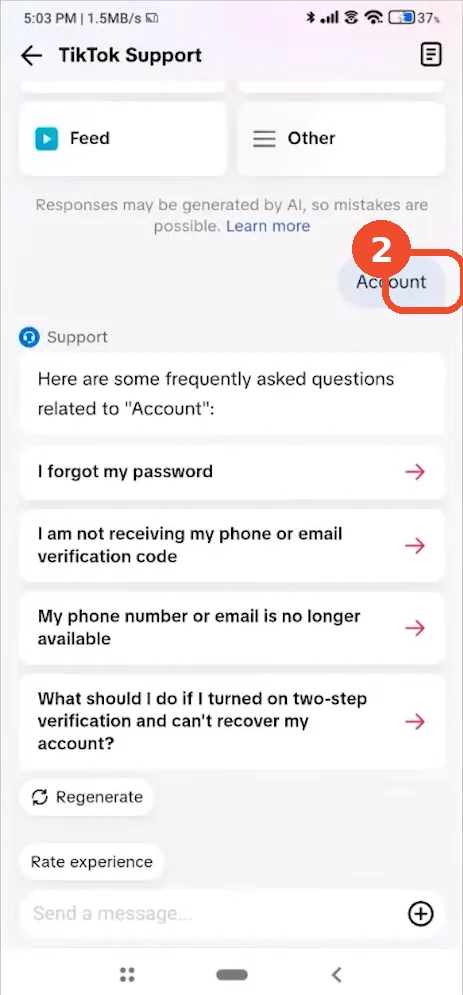
Go to Settings and privacy → Report a problem. TikTok Support opens with topic suggestions; tap Account to see the account FAQ. If you were recently reported, changed your phone number, or TikTok needs to verify your age for messaging, sending can be frozen for around 24 hours — the FAQ items here are the official route to appeal or submit an ID if your account is locked for an age check.
Clear the cache
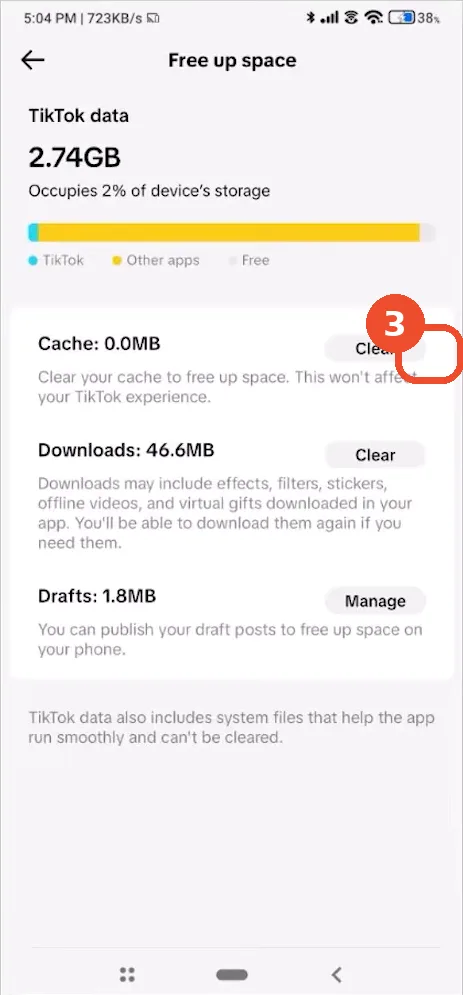
Go to Settings and privacy → Free up space and tap Clear next to Cache. Then force-close TikTok, reopen it and try sending again — a stale cache is the last of the three usual causes.
If messages still do not send
- Test with a second person who definitely follows you back: if that chat works, the problem is the first conversation, not your account.
- Check the other direction too — if no one can message you, your own messaging privacy settings may be set to No one (Settings and privacy → Privacy → Direct messages).
- Still stuck after 24 hours with no restriction notice? Send TikTok Support a message from the same Report a problem page, as in the tapping-too-fast guide.